
Picture this:
A family enrolls in one of your programs.
What happens next?
Does someone on your team need to review the enrollment? Is this a brand-new customer or an existing family? Which onboarding communications should they receive? How do you update tracking?
Now imagine managing hundreds or thousands of enrollments every year.
If your team has to manually coordinate all these activities, the administrative workload can quickly become overwhelming.
And if each enrollment requires 10–20 minutes of administrative work, those repetitive tasks can add up to hundreds of hours every year. Each one of those hours is time not spent on what really moves the needle.
What if most of that work could happen automatically?
Imagine a new enrollment triggering a customized onboarding workflow: the right information is sent to your CRM and tracking is updated, the appropriate communications are initiated, and your team only needs to step in when human intervention is required.
That’s exactly the type of process I demonstrated during a webinar presented in collaboration with Jackrabbit Technologies.
Using Jackrabbit, Zapier, and ActiveCampaign, I showed how to build a customized enrollment onboarding workflow that combines an intermediate approval stage, conditional logic for new and existing families, and personalized communications.
Let’s walk through the implementation and explore how you could adapt it to your own Youth Activity Center.
Building a Customized Enrollment Onboarding Workflow
One of the examples I presented during the webinar was an enrollment onboarding process that included an intermediate approval step.
The objective was straightforward: automatically collect new enrollment information from Jackrabbit, allow the team to review it, and then trigger the appropriate onboarding activities.
Instead of having employees manually transfer information between applications or coordinate every subsequent activity, we introduced an automation layer.
Here’s how the workflow operates.
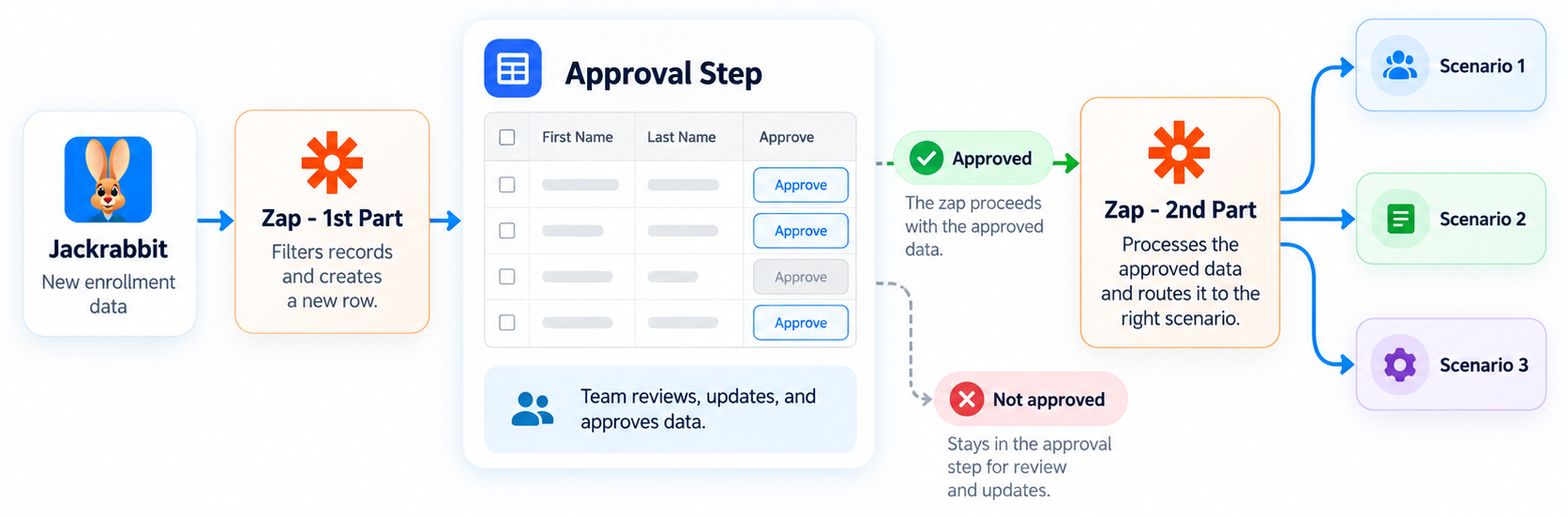
Example of a Jackrabbit enrollment onboarding workflow using Zapier, human approval, and conditional processing.
Step 1: Capture the Enrollment From Jackrabbit
The process begins when a new enrollment is created in Jackrabbit: Zapier captures the event and receives the relevant enrollment information.
However, not every event should trigger the same process.
In the demonstration, I introduced a filtering step that checked the Enroll Type Jackrabbit field. The automation only proceeded when it matched Enrolled.
Other events, such as trials, were excluded from this particular workflow. This distinction matters because different events can require entirely different processes:
- A trial registration might initiate a sequence of confirmations, reminders, and follow-up communications.
- A full enrollment, on the other hand, should initiate the appropriate onboarding process.
By introducing this initial condition, we ensure that the workflow only processes the information relevant to its purpose.
Step 2: Introduce an Intermediate Approval Stage
This is where the example becomes particularly interesting, because many Youth Activity Centers want to have an approval step in place, allowing their team to review and verify new enrollments before moving forward with the onboarding process.
Instead of immediately transferring the enrollment information to the CRM, Zapier creates a record inside Zapier Tables. Think of it as an intermediate workspace where your team can review the information before allowing the automation to continue.
During the demonstration, I showed how employees could open an enrollment record, review its information, make changes, and even add information that wasn’t originally available in Jackrabbit.
For example, I created an additional dropdown field to illustrate how a team member could enrich the enrollment data before approving it.
Once everything has been reviewed, the employee simply clicks an approval button. That action triggers another automation, which continues processing the approved information.
Your team retains control over the approval, while automation takes care of the repetitive activities surrounding it.
That’s an important distinction!
We’re not trying to remove every human interaction. We’re trying to reduce administrative work while making the process more consistent.
Step 3: Trigger the Appropriate Onboarding Workflow
What happens after someone clicks Approve?
Approving the enrollment doesn’t simply transfer information to another application. It initiates a series of actions based on the family’s existing relationship with your center and other factors such as the enrollment program and session.
In the webinar, I demonstrated how a second Zap searches ActiveCampaign to determine whether the family already exists in the CRM. Based on the result, conditional logic directs the enrollment through the appropriate workflow.
For example, a completely new family might require a new CRM record / update of the lead record, and an introductory onboarding sequence.
An existing customer enrolling in another program might simply need their information updated and a different set of communications.
The team doesn’t need to execute these activities individually. One approval can initiate an entire sequence of automated actions, customized according to the enrollment.
Watch the Enrollment Onboarding Workflow in Action
In this excerpt from my original Jackrabbit webinar, I demonstrate how enrollment information moves from Jackrabbit into Zapier Tables, how the intermediate approval works, and how the automation processes new and existing families differently.
The demonstration was recorded in 2024. Some product interfaces and features may have evolved since then, but the underlying workflow-design principles remain relevant.
Customizing the Onboarding Process for Different Enrollment Scenarios
Here’s where automation becomes particularly valuable.
A completely new family joining your center and an existing customer enrolling in another program represent two different scenarios.
Although both generate enrollment events, the subsequent activities are not identical.
In the webinar, I demonstrated how conditional logic allows you to distinguish between these scenarios and execute different workflows.
Let’s look at both examples.
Scenario 1: A Completely New Family Enrolls
Imagine a family enrolling in your center for the first time.
Once the enrollment has been approved, Zapier searches ActiveCampaign to determine whether a corresponding contact already exists.
If no matching contact is found, the automation creates a new CRM record using the approved enrollment information.
During the live demonstration, I approved a new enrollment and showed how the automation identified that the family didn’t exist in ActiveCampaign.
It automatically created the contact and populated the relevant enrollment information.
This eliminates the need for your team to manually create and update every CRM record after reviewing an enrollment.
The process doesn’t stop there.
Depending on your center’s requirements, the workflow can initiate additional onboarding activities.
For example, during the webinar, I illustrated how personalized SMS messages could be incorporated into the process.
Instead of sending the same generic message to every family, you can personalize communications using information collected during enrollment. The message might include the student’s program, teacher’s name, or other relevant details.
I also discussed the possibility of using the same platform to send physical welcome postcards to newly enrolled students.
And you could extend the workflow further, introducing additional communications or internal activities based on your center’s requirements.
The objective is to coordinate the entire onboarding experience, rather than simply transferring enrollment information between applications.
Scenario 2: An Existing Family Enrolls in Another Program
Now imagine a different situation.
An existing family decides to enroll in an additional program.
The enrollment information still needs to be processed, but should that family receive exactly the same communications as someone enrolling for the first time?
Not necessarily.
In the webinar, I demonstrated a separate workflow for contacts who already existed in ActiveCampaign and were classified as existing customers.
Instead of creating another contact, the automation updated the existing record and family’s enrollment information.
The result was one contact record containing the relevant enrollment information for all programs.
This also creates opportunities for more accurate segmentation and personalized communications you can send from your CRM.
For example, you could identify families enrolled in a specific program, families participating in multiple programs, or customers who might benefit from additional communications related to their activities.
And all of this can happen without requiring employees to manually update every enrollment record.
Taking Customization Further
The examples demonstrated in the webinar are just a starting point.
Depending on your center’s operational requirements, you could introduce additional conditions to customize the onboarding experience.
For example, you might want to differentiate between:
- Programs: Your programs might require different communications and internal activities.
- Seasons: Your Summer and School Year programs might require different sets of actions. Early bird registrations might require a specific worklow.
- Internal activities: You might need to assign responsibilities to specific employees or request additional information before the process continues.
Should Every Enrollment Require Human Approval?
In the webinar, I presented two different approaches.
- The first included the intermediate approval stage we’ve just explored.
- The second removed that stage, allowing the workflow to process enrollment information directly through conditional logic.
Both approaches can be useful, depending on your operational requirements.
If your team frequently needs to review enrollment information, correct records, or make decisions before onboarding begins, maintaining an approval stage might be appropriate.
However, requiring someone to approve every enrollment could also introduce an unnecessary bottleneck.
If your data is reliable, your operating rules are clearly defined, and the process is predictable, you can automate the entire sequence.
There’s also a third possibility: combining both approaches.
For example, you could design a hybrid workflow in which standard enrollments proceed automatically, while exceptional situations requiring additional verification are directed to your team.
This could allow your center to reduce administrative work without sacrificing control over situations that genuinely require human judgment.
Beyond Enrollment Onboarding
Although we’ve focused on enrollment onboarding, the same approach can be applied to other operational processes.
Think about trial management, enrollment changes management, etc.
Each process can combine automated activities, conditional logic, and human intervention depending on your center’s requirements.
For example, a withdrawal request might require an employee to review the situation before the appropriate administrative activities and communications are initiated.
A trial registration, on the other hand, might be suitable for a more automated workflow involving confirmations, reminders, and follow-up activities.
The underlying principle remains the same.
The goal is to identify where automation can reduce unnecessary work while maintaining the appropriate level of control.
Start With Your Process, Not Your Tools
Here’s the most important takeaway from the entire example.
We started with an enrollment onboarding process, introduced an intermediate approval stage, and built different workflows based on the family’s existing relationship with the center.
But none of this would have worked effectively without first defining what should happen in each situation.
Technology executes the process. It doesn’t design the process for you.
Before introducing new automations, you need to understand your current operations, define responsibilities, identify exceptions, and determine which activities should be automated.
The same principle applies when connecting Jackrabbit to your CRM.
Simply synchronizing information doesn’t mean that the correct onboarding activities will take place or that your team will know what to do when something doesn’t follow the standard scenario.
If you want to explore the technical side, I’ve covered this topic in a separate article.
Read: Jackrabbit CRM Integration — How to Connect Your CRM Using Zapier
Ultimately, the goal is to create an operating system that reduces unnecessary administrative work, supports your team, and delivers a consistent customer experience as your center grows.
Want to understand how your current processes could be improved?
Our Audit & Analysis service helps established Youth Activity Centers evaluate their existing workflows, identify improvement opportunities, and design the processes and operational infrastructure needed to support their growth.


